SpeakEase

Dictation for non-native English speakers

Hold a key and talk into any app on your Mac. SpeakEase keeps what you actually said, then shows the grammar fix, a more natural way to say it, and the sounds to work on, right next to your text.

Say something
Insert it as

What the dot tells you
A grammar or wording fix
A sound to work on
Nothing to fix
Team chat
Maya

A demo with sample sentences. In the app this happens wherever your cursor is: a chat, an email, a prompt.

Why not a study app, or ordinary dictation?

A study app needs a session

You have to decide, again and again, that now is the time to practise English. Most people stop making that decision. Work, though, happens every day.

Dictation hides your level

Ordinary dictation quietly turns broken English into clean text. That is convenient, and it means you never find out how you actually speak.

SpeakEase does both jobs in one place

It writes down what you really said first, then offers the fix beside your text without pulling you out of what you were doing. The messages, prompts and emails you were going to write anyway become the practice. The goal is to think in English every day, and not only when you sit down to study.

What happens when you let go of the key

  1. It checks the transcript against your audio

    Speech recognition tends to tidy up non-native English and to invent words in pauses. A phoneme model on your Mac compares the transcript with the recording, drops what you never said and keeps what you did, down to “he think”.

  2. It inserts the version you chose

    My words is exactly what you said, minus the ums. Fix grammar corrects it. Sound native rewrites it the way a native speaker would put it. Chinese words you mixed in come out as natural English.

  3. A dot appears at the end of your text

    Pronunciation shows first, because it is scored on your Mac. Grammar and a more natural phrasing follow a few seconds later in the same dot. Nothing to fix turns it green. It never takes focus, and it leaves when you send the message.

  4. You can hear yourself

    Hover the dot to play back what you just said, as you said it. For each sound to work on, 你的 plays your word from the recording and 标准 plays how it should sound.

Pronunciation, limited to the habits worth fixing

Scoring every phoneme would bury you in notes. SpeakEase reports only the patterns that matter most for Mandarin speakers, and it does the scoring locally.

If recognition heard “light” when you meant “right”, it tells you which sound caused it.

  • ththink, months
  • v / wvery, west
  • r / lright, light
  • l / nlow, no
  • ngthing, thin
  • ee / isheep, ship
  • -s -t -dword endings that get dropped

The Learn page keeps the pattern

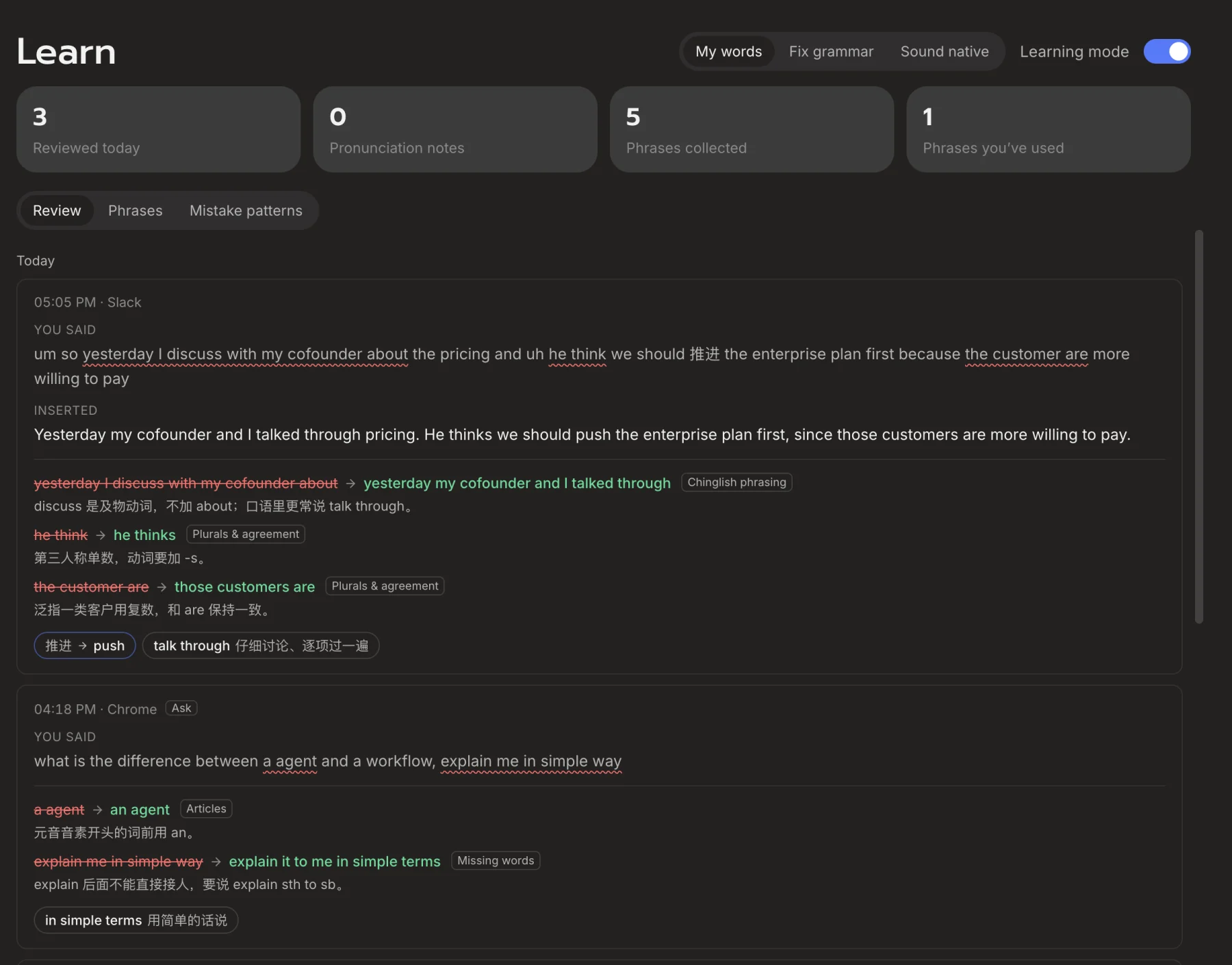
The dot covers one dictation. The Learn page collects all of them, so you can see what keeps coming back.

Every dictation with what you said, what was inserted, and each fix explained.

SpeakEase Learn page, Review tab: a dictation with the original sentence, the inserted version, three corrections with explanations in Chinese, and two saved phrases

Underneath, it is a full dictation app

English already strong? Turn Learning mode off and SpeakEase is plain dictation.

Fn1

Dictate

Cleans up fillers and self-corrections, adds punctuation, and inserts the text at your cursor.

Fn2

Translate

Speak in any language and insert the translation.

FnA

Ask anything

With text selected, it rewrites the text in place. Otherwise it answers in a small card, in Chinese by default: you practise speaking English and read the answer in the language you absorb fastest.

Your recordings stay on your Mac

Dictations and recordings are stored only on this device, and pronunciation is scored there too. Audio and text are sent only to the AI providers you configure, to process each dictation.

What's new

One entry per version of the app, newest first.

First build

  • Dictate, translate and ask anything, each from its own shortcut
  • Learning mode keeps what you actually said and inserts it as My words, Fix grammar or Sound native
  • A feedback dot next to your text for grammar, a more natural phrasing and pronunciation
  • Playback of your own recording, and each flagged word against how it should sound
  • Learn page with a review of every dictation, collected phrases and mistake patterns
In development for Mac

The current version is 0.1.0. There is no public download yet. SpeakEase is one of the products I build on my own.

See the others at lucasdai.cn